
WHAT’S THE ISSUE?
By Default, Colibri theme doesn’t play video on HERO SECTION of a website. Very annoying. Instead of playing the video like the desktop version, it forces us to put a static image. They say, it can’t be done because the mobile browser won’t let you do it. It’s nothing but a big fat lie!
THE SOLUTION
STEP 1
Do exactly like the video:
STEP 2
Go to your hosting File Manager where the website is hosted. Normally the wordpress files are sitting inside public_html folder. Your hosting directry might be different.
Navigate to this path:
wp-content > themes > colibri-wp
STEP 3
Open the php file called
functions.php
STEP 4
Copy the code from below and paste at the end of the line inside functions.php
STEP 5
Now we need to place the video file on our web server. I recommend you rename the video file as “vid.mp4” or “vid1.mp4”.
Simply, upload the video inside the root directory.
Root directory?
where you see all the wordpress folders (wp-content, wp-admin).
NOTE: The video has to be converted enough to be light-weight. Do not upload the video as it is.
Convert the video in 1920X1080. Max bitrate: 5mbps and average 2.5. If you dont have average bitrate option, just convert it in 3.5 mbps.
The video has to be in .mp4
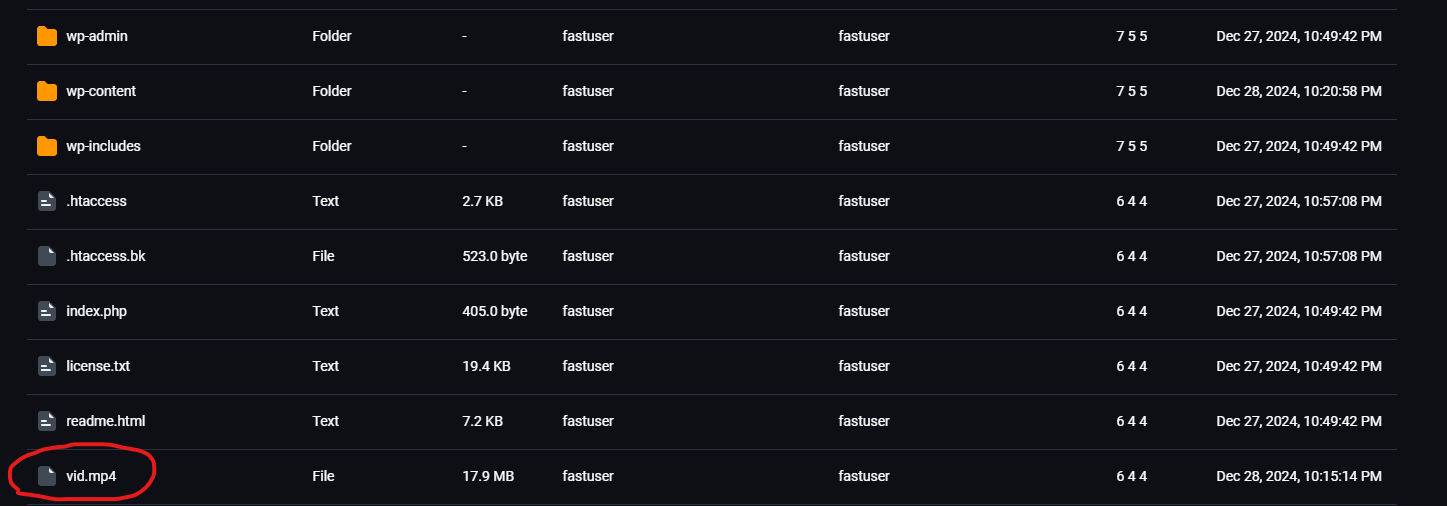
STEP 6
Great!
Now we are ready to place our shortcode.
[full_video src=”https://yourwebsite.com/videoname.mp4″ headline=”Headline”]
What to change: replace https://yourwebsite.com/videoname.mp4 to your site name and video name.
Replace Headline to your desired headline text.
Why mobile browsers block this in the first place
The behaviour Colibri falls back on is not arbitrary. Mobile browsers historically refused to autoplay video to protect people on metered data connections, so page builders learned to substitute a static poster image on small screens rather than ship something that would silently fail. That default is now more conservative than it needs to be.
Modern iOS and Android browsers will happily autoplay a video provided it is muted, marked playsinline, and small enough to load quickly. The fix above simply supplies those attributes and points the hero at a mobile-sized file, which is why it works where the theme's own setting does not.
Troubleshooting and good practice
The video still will not play on my phone
Check three things in order: the file is genuinely muted, the markup includes playsinline, and the video actually exists at the path you referenced. A 404 on the video file produces exactly the same blank hero as a blocked autoplay.
What size should the mobile video be?
Keep it under about 2 MB and no wider than 720 px. A hero video is decoration, and a large file will cost you more in bounce rate and Core Web Vitals than it gains you in polish.
Will this survive a theme update?
Edits made directly in the theme's functions.php will be overwritten when Colibri updates. Put the snippet in a child theme, or in a small site-specific plugin, so updates leave it intact.
Does an autoplaying hero video hurt SEO?
It can, if it delays the largest contentful paint. Always supply a poster image so something meaningful renders immediately, and test the page on a throttled mobile connection before deciding the video earns its place.